What's new in LAMB 0.7
Tagged v0.7 on 20 October 2026. Source at the tag. It follows 0.6 of 20 April 2026 and gathers six months of work, 475 commits. This page lists the main changes, not every one. The 0.8 guides describe these features step by step, because 0.8 keeps them as they are.
At a glance
| Change | Who it is for | Needs setup? |
|---|---|---|
| LAMB LEGATUS, the agent for teachers | Teachers | The organization chooses its model |
| A Moodle connection for LAMB LEGATUS | Teachers, organization administrators | Yes. The organization enables it and each teacher connects their own account. |
| Test cases | Teachers | No |
| Support access for administrators | Administrators | No |
| Creator API keys | Developers | The organization must allow them |
| Installation and upgrades | System administrators | Read before upgrading from 0.6 |
| Security fixes | Everyone | No |
| Smaller changes | Everyone | No |
LAMB LEGATUS, the agent for teachers
What it is. The assistant-building helper of earlier versions became LAMB LEGATUS in 0.7: an agent inside LAMB Creator that a teacher talks to in plain language. It helps create and improve assistants, work with knowledge bases and rubrics, write and run test cases, and find the way around LAMB. It acts for the teacher, and the teacher keeps the decisions.
Why. A good assistant takes more than a prompt: retrieval settings, a rubric, tests that show whether a change helped. Most teachers do not have the hours to learn all of it. An agent that knows LAMB can do the legwork, on one condition: nothing of the teacher’s changes without the teacher saying so.
What 0.7 brought.
- A panel that stays beside your work. LAMB LEGATUS opens next to the page you are on and follows you from page to page, so you watch LAMB change as you talk. You can resize it and stop a turn that is running.
- Approval before any change. A change to an assistant, a knowledge base, a rubric or a Moodle course waits on a card that says what will change, with buttons to approve it, edit the proposal or cancel. The model cannot skip that step.
- Learning scenarios. Describe once who your students are, what the activity is for and what limits apply. A conversation that uses a scenario works with that context instead of asking again.
- Tools for the whole workspace. It can create and edit assistants, knowledge bases, rubrics and test cases, read the documents you point it to, and keep a notebook during a conversation.
- The organization decides how it runs. An organization administrator chooses the model LAMB LEGATUS uses, which edition of its instructions it follows, and the languages it answers in.
- A name. The interface calls it LAMB LEGATUS, after the Roman legatus who acted on behalf of the Senate.
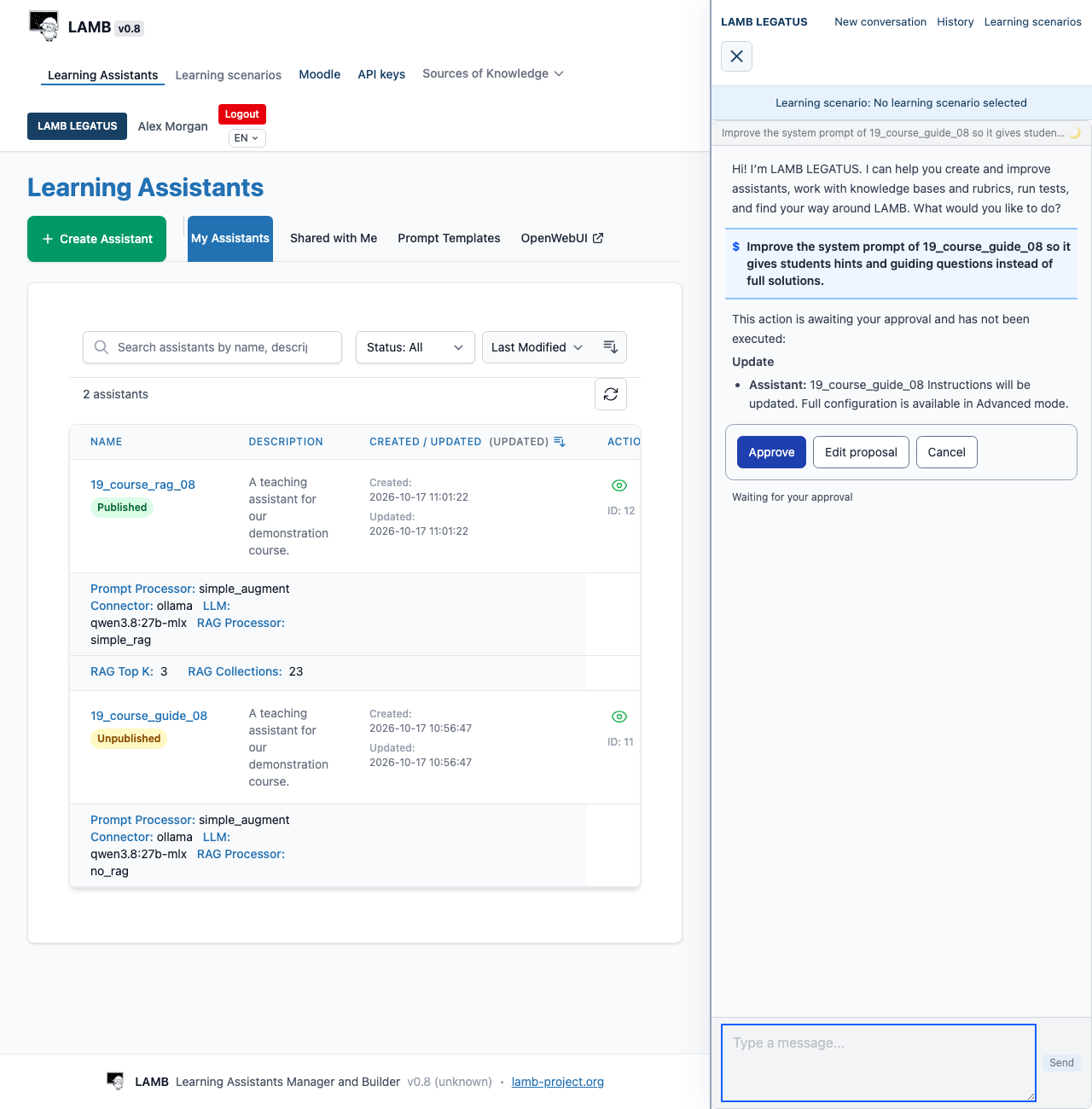
The guide Work with LAMB LEGATUS shows what to ask it, how approvals work and what it cannot do. 0.9 adds Auto mode, where one approval covers a whole plan.
A Moodle connection for LAMB LEGATUS
What it is. A teacher can connect their own Moodle account to LAMB. LAMB LEGATUS can then read the courses that teacher teaches and, after the teacher approves, import course materials into a LAMB knowledge base. LAMB can do only what that Moodle account is already allowed to do.
Why. The materials for an assistant already sit in the Moodle course. Downloading them and uploading them again by hand was the slowest step of building an assistant, and the one most often skipped. The connection uses Moodle’s standard web services, because institutions do not install third-party Moodle plugins for one tool: no Moodle plugin and no Moodle-side code are needed.
What it can do.
- Without asking: read courses, assignments, forums, grades, quizzes and the calendar of the courses where you teach, and read a course file, Page or Book without importing it.
- After your approval, one card per action: import a File, a Folder, a Page or a Book into a new or an existing knowledge base. The card lists the source, the destination, each file and the chunk settings.
- Only if the organization allows writes, and with approval each time: post or reply in a forum, or save one learner’s grade with its rationale. Otherwise it offers a draft for you to post yourself.
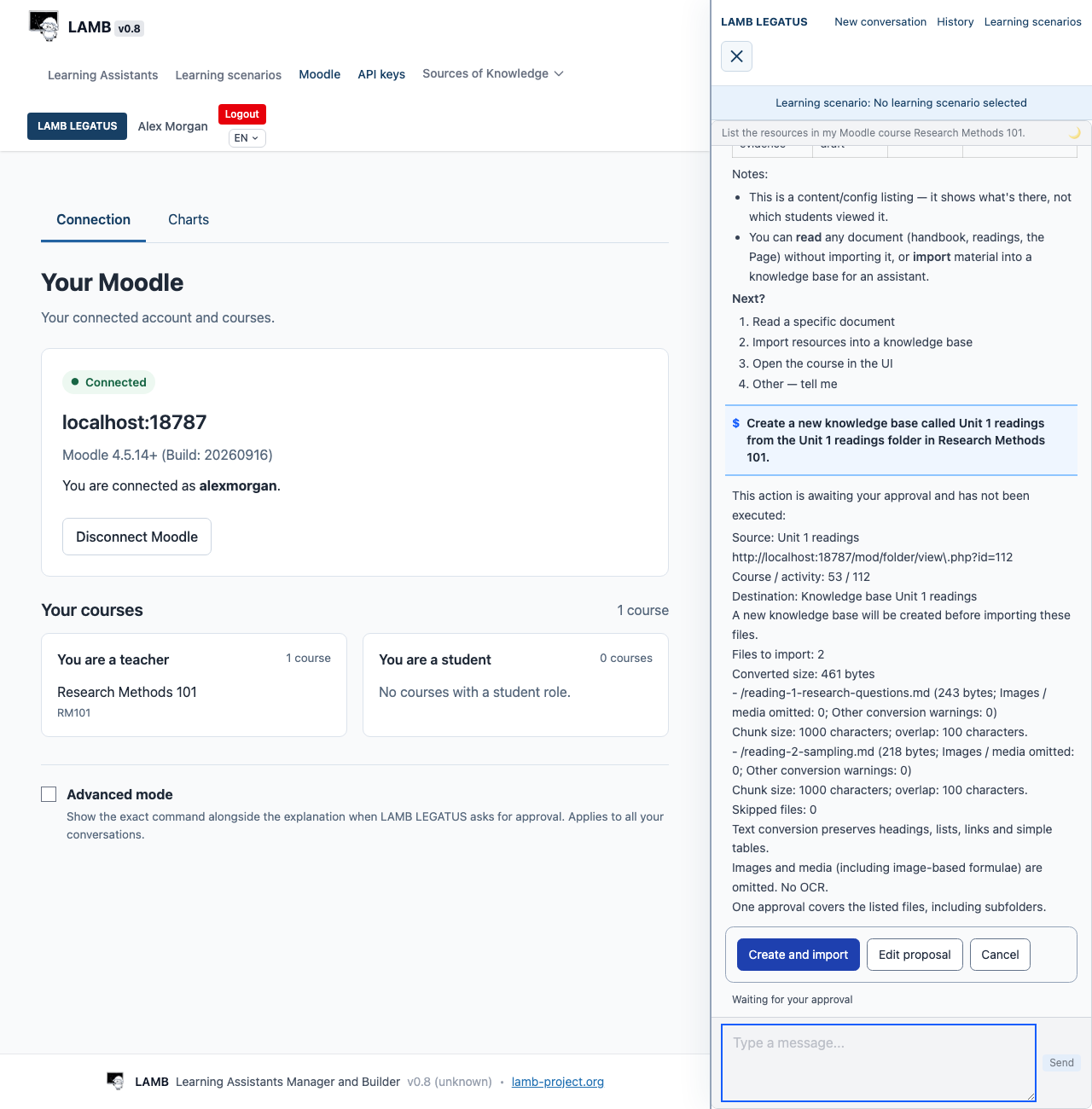
What to know. The organization administrator enables the connection and decides whether it may write. Each teacher connects their own account, with a token or with the QR code Moodle shows for its mobile app. The guide Connect LAMB and Moodle covers the Moodle settings, the connection and what reaches the model provider.
Test cases
What earlier versions called test scenarios are now test cases: a question, what a good answer should do, and the saved runs of the assistant against it. LAMB LEGATUS can write test cases with you and run them. A test run records the assistant’s settings at that moment, so a result can be compared with a later one. See Test and evaluate an assistant.
Support access for administrators
What it is. An administrator can act as a creator for a limited time, to see what that teacher sees. Each use is recorded in the audit log and the teacher is told about it. The administrator returns to their own account when the support session ends or expires.
Why. “My assistant answers strangely” is hard to diagnose from the outside. Before 0.7 the options were asking the teacher for a password or guessing. Support access gives administrators a way to help that leaves a record (issue #523).
Creator API keys
What it is. A creator can make API keys of their own for LAMB’s OpenAI-compatible address. A key reaches only that creator’s published assistants. The organization decides whether its creators may use them.
Why. An external application that used a LAMB assistant needed the installation’s own service key, which opens every assistant. Personal keys let a teacher or a developer connect a tool to their assistants and nothing else. The learning-tool template is built on them.
Installation and upgrades
- A new migration system. Database changes are numbered and recorded, and LAMB applies the missing ones when it starts. An upgrade no longer depends on running scripts by hand.
- A checked path for existing data. 0.7 includes a verified procedure to move an existing installation’s data into the storage layout the container deployment uses.
- Deployment with container images is documented, with a setting for the number of worker processes (
LAMB_WORKERS) and an optional configuration for GPU inference.
Back up the database before upgrading, as for any version.
Security fixes
A security audit in June 2026 led to ten fixes, all in 0.7 (issues #408 to #417). Among them: ownership is enforced when an assistant is updated, two endpoints validate their credentials, the administration page checks the administrator role, the accounts LAMB creates in the student chat get random passwords, model and agent output is sanitised before it is shown, and the example configuration no longer carries weak default secrets. A later fix rejects invalid credentials on the address that lists models (issue #472).
Smaller changes
- Notifications in the page replace the browser’s alert boxes.
- YouTube sources show the video title in an answer’s list of sources.
- Rubric weights can be edited without losing the identity of criteria and levels, so earlier evaluations still refer to the right ones.
About the screenshots
The two images on this page were captured on LAMB 0.8 on 17 October 2026 for the guides, with a synthetic teacher and synthetic course material. These screens are the same in 0.7 apart from the version label: between 0.7 and 0.8 the Creator interface gained only the LLM access settings. About the guide screenshots.